







Unsere Dienstleistung


Featured Products

Posts
-
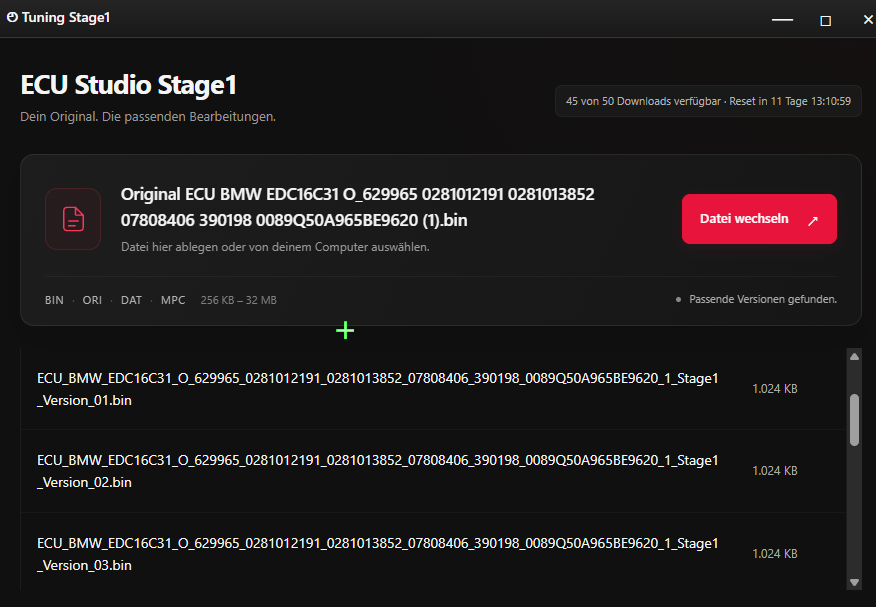
There are different versions. You can test which one runs best.
-
When i put in the file i get the stage 1 Files but all say Version 1 then Version 2, ....
how can i tell wich is wich i want one with stage 1 and egr off but it no where says this -
November is just around the corner, and a lot is happening at Digitools24!
As the title suggests, we have several major updates planned for November 2026. We're restructuring parts of our system, expanding access to our ECU database, and continuing to develop new software solutions.
Most of these technical changes will happen behind the scenes, so you probably won't notice much of the transition itself. However, some sections will disappear, others will be expanded, and new features will be introduced.
Here's an overview of what's coming!
🛒 Black November 2026 – We're Restructuring Our Shop!
One of the biggest changes concerns our online shop.
In the future, we want to focus more on developing and selling our own software solutions. That's why we're gradually transitioning our shop from hardware products to software.
Starting November 1, 2026, we're launching our BLACK NOVEMBER SALE!
During this promotion, we'll offer many of our remaining hardware products at significantly reduced prices. Some items will even be sold at our current purchase prices.
Our goal is to clear our remaining inventory and make room for our upcoming software products.
Important: All offers are available only while stocks last.
📂 ECU Database – Original Files for Everyone!
We're also making some major changes to our ECU database.
Over the past few years, we gradually restricted public access to our database. Now, we're taking a different approach by making part of our collection freely accessible again.
We're opening access to our extensive collection of original ECU files that we've personally read and collected over the past 12 years!
To make this possible, we're currently rebuilding and updating the public download section of our website.
We're importing our original ECU files, updating existing entries, and improving file descriptions.
And yes, this time we're even including the file sizes in KB in the descriptions! 😊
New Download Rules
The following conditions will apply:
Guests (not registered): 5 free downloads
Registered users: Unlimited downloads of original ECU files
Just last week, we increased the free download allowance for registered users to two downloads per day.
That daily limit will now be removed completely!
This means registered users will be able to download as many original ECU files as they need.
The transition is already underway. Since we're importing and updating a large number of files, the process will take some additional time.
🔍 ECU File Center vs. Online ECU Stage1 Studio – What's the Difference?
Over the past weeks and months, we've invested a considerable amount of time into improving our file search and automated tuning file creation systems.
Our goal from the beginning was to make finding suitable Stage1 files as simple and automated as possible.
Initially, we developed a solution directly integrated into our website. Later, we created another system running on a dedicated server.
As a result, we now have two separate systems, each offering its own advantages.
1. ECU File Center – Automatic File Search
Our ECU File Center is accessible directly through our website.
Simply upload your original ECU flash file, and the system will analyze the available data and automatically search for a suitable Stage1 file for your engine control unit.
Important: The system requires original ECU flash data without immobilizer data.
Additional features include:
Automatic search for matching Stage1 files
Manual file searches using our server search engine
Access to our integrated file manager
Browsing and exploring our available file collection
This gives you several ways to find the correct file for your ECU.
New from November:
The ECU File Center will now be available to all three membership levels:
Bronze, Silver, and Gold!
This means Bronze members will also gain access to this service.
2. Online ECU Stage1 Studio – The Automatic Stage1 Builder
Our Online ECU Stage1 Studio takes things one step further.
This is a standalone product that operates independently of our website on a separate server.
A dedicated online application is available for download to access the service.
The main difference compared to the ECU File Center is how files are processed.
While the ECU File Center primarily searches for existing matching files, our Online ECU Stage1 Studio uses an automated Stage1 building system.
This system can identify differences between original files, match the corresponding modifications, and provide suitable Stage1 files for download.
It also supports tuning file creation with available deactivation options.
Our goal is to automate as many of these processes as possible, making ECU file processing significantly easier and faster.
🎁 Additional Benefits for Silver and Gold Members!
Since we're now making the ECU File Center available to Bronze members, we naturally want to offer our Silver and Gold members some additional benefits as well.
That's why both membership levels will receive monthly credits for our Online ECU Stage1 Studio.
Your Monthly Credits
🥈 Silver Members: 10 Credits per Month
🥇 Gold Members: 20 Credits per Month
These credits can be used in our Online Studio to create tuning files with the available deactivation options.
How Do You Receive Your Credits?
For now, credit distribution will be handled manually.
Silver and Gold members can request their credits directly from me and will receive a personal basket code to redeem them in the Online Studio.
Unfortunately, we currently don't have a technical solution to automate the monthly distribution of these credits.
However, we're already working on it!
Before we can implement automatic credit distribution, we first need to complete the planned restructuring of our online shop.
Until then, credits will continue to be issued upon request.
💻 DT24 Software – We're Expanding Our Own Software Tools!
In addition to our online services, we've been focusing heavily on developing our own software solutions.
We've already created several useful offline tools that you can run directly on your computer using your own files.
One of these tools is our OLS-Inspector, which is already available.
This software has also laid the foundation for several additional developments.
But we're not stopping there!
New Offline ECU Studio Coming in December 2026!
Building on our previous developments, we're currently working on our new Offline ECU Studio.
This will be a standalone software solution that we plan to release in December 2026.
With this project, we aim to combine our experience in automated ECU file analysis and Stage1 creation into a locally operated application.
We'll share more details about its features and capabilities before the official release.
Stay tuned! 😊
🚀 Conclusion – Exciting Times Ahead at Digitools24!
November 2026 will bring several important changes to Digitools24.
We're gradually moving away from traditional hardware sales and shifting our focus toward developing our own software solutions.
At the same time, we're opening our extensive original ECU database to registered users, expanding the benefits of our memberships, and continuing to improve our automated ECU services.
Our main goal is to make our systems simpler, faster, and increasingly automated in the long run.
Some of these changes will take a little more time, but development and implementation are already well underway.
That's our preview of what's coming in November 2026!
Thank you to everyone who has supported Digitools24 over the years and continues to follow our developments.
Your Digitools24 Team -
Der November steht vor der Tür und bei Digitools24 wird sich wieder einiges verändern!
Wie die Überschrift bereits verrät, haben wir für November 2026 einige größere Updates geplant. Wir stellen Teile unseres Systems um, erweitern den Zugriff auf unsere ECU-Datenbank und arbeiten gleichzeitig an neuen Softwarelösungen.
Von den technischen Umstellungen werdet ihr größtenteils nicht viel mitbekommen. Allerdings werden einige Bereiche verschwinden, andere erweitert und neue Funktionen hinzukommen.
Hier gibt es einen Überblick darüber, was euch erwartet.
🛒 Black November 2026 – Wir stellen unseren Shop um!
Eine der größten Veränderungen betrifft unseren Shop.
Wir möchten uns künftig stärker auf die Entwicklung und den Vertrieb eigener Software konzentrieren. Deshalb werden wir unseren bisherigen Shop nach und nach von Hardware auf Software umstellen.
Ab dem 1. November 2026 starten wir deshalb unseren BLACK NOVEMBER!
Dabei werden wir zahlreiche noch vorhandene Hardwareartikel zu stark reduzierten Preisen anbieten. Einige Produkte werden wir sogar zu unseren aktuellen Einkaufspreisen abgeben.
Unser Ziel ist es, die vorhandenen Lagerbestände abzubauen und Platz für unsere neuen Softwareprodukte zu schaffen.
Wichtig: Die Angebote gelten nur, solange der jeweilige Lagerbestand reicht.
📂 ECU-Datenbank – Originaldateien für alle!
Auch bei unserer ECU-Datenbank stehen größere Veränderungen an.
In den vergangenen Jahren hatten wir unsere Datenbank zunehmend vor öffentlichen Zugriffen geschützt. Diesen Weg möchten wir nun teilweise wieder öffnen.
Wir werden unsere umfangreiche Sammlung an originalen ECU-Dateien, die wir in den vergangenen 12 Jahren selbst ausgelesen haben, kostenlos zugänglich machen!
Dafür überarbeiten wir derzeit den gesamten öffentlichen Downloadbereich unserer Webseite.
Unsere Originaldateien werden neu importiert, vorhandene Datensätze aktualisiert und die Dateibeschreibungen überarbeitet.
Und ja, diesmal schreiben wir sogar die Dateigrößen in KB mit in die Beschreibungen! 😊
Neue Downloadregelungen
Künftig gelten folgende Bedingungen:
Gäste (nicht registriert): 5 kostenlose Downloads
Registrierte Benutzer: Unbegrenzte Downloads von originalen ECU-Dateien
Erst in der vergangenen Woche hatten wir den kostenlosen Downloadbereich für registrierte Mitglieder auf zwei Downloads täglich erweitert.
Dieses Tageslimit wird nun vollständig aufgehoben!
Damit können registrierte Benutzer künftig so viele originale ECU-Dateien herunterladen, wie sie benötigen.
Die Umstellung läuft bereits. Da wir eine größere Menge an Dateien neu importieren und bearbeiten müssen, werden die Arbeiten noch etwas Zeit in Anspruch nehmen.
🔍 ECU File Center vs. Online ECU Stage1 Studio – Wo liegt der Unterschied?
In den vergangenen Wochen und Monaten haben wir viel Zeit damit verbracht, unsere Dateisuche und die automatische Erstellung von Tuningfiles weiterzuentwickeln.
Unser Ziel war von Anfang an, die Suche nach passenden Stage1-Dateien möglichst einfach und weitgehend automatisch zu gestalten.
Anfangs haben wir dafür eine Lösung direkt auf unserer Webseite entwickelt. Später entstand eine weitere Lösung auf einem eigenständigen Server.
Daraus sind mittlerweile zwei unterschiedliche Systeme geworden, die jeweils ihre eigenen Vorteile bieten.
1. ECU File Center – Die automatische Dateisuche
Unser ECU File Center ist direkt über unsere Webseite erreichbar.
Hier könnt ihr eure originale ECU-Flashdatei hochladen. Das System analysiert die vorhandenen Daten und sucht anschließend automatisch nach einer passenden Stage1-Datei für euer Motorsteuergerät.
Wichtig: Für die Suche werden originale ECU-Flashdaten ohne Wegfahrsperrendaten benötigt.
Zusätzlich stehen euch weitere Möglichkeiten zur Verfügung:
Automatische Suche nach passenden Stage1-Dateien
Manuelle Suche über unsere Server-Suchmaschine
Zugriff auf unseren integrierten Dateimanager
Durchsuchen und Erkunden unserer vorhandenen Dateibestände
Damit habt ihr verschiedene Möglichkeiten, die passende Datei für euer Steuergerät zu finden.
Neu ab November:
Das ECU File Center steht künftig allen drei Mitgliedsstufen zur Verfügung:
Bronze, Silber und Gold!
Damit erhalten nun auch unsere Bronze-Mitglieder Zugriff auf diesen Service.
2. Online ECU Stage1 Studio – Der automatische Stage1-Baukasten
Unser Online ECU Stage1 Studio geht noch einen Schritt weiter.
Hierbei handelt es sich um ein eigenständiges Produkt, das unabhängig von unserer Webseite auf einem separaten Server betrieben wird.
Für die Nutzung steht eine eigene Online-App zur Verfügung, die ihr herunterladen könnt.
Der große Unterschied zum ECU File Center liegt in der Verarbeitung der Dateien.
Während das ECU File Center hauptsächlich nach bereits vorhandenen und passenden Dateien sucht, arbeitet unser Online ECU Stage1 Studio mit einem automatisierten Stage1-Baukasten.
Dieser kann Unterschiede zwischen Originaldateien erkennen, entsprechende Änderungen zuordnen und daraus passende Stage1-Dateien zum Download bereitstellen.
Damit lassen sich Tuningfiles einschließlich unterstützter Deaktivierungsoptionen erstellen.
Unser Ziel ist es, möglichst viele dieser Arbeitsschritte zu automatisieren und euch damit die Bearbeitung erheblich zu erleichtern.
🎁 Zusätzliche Vorteile für Silber- und Gold-Mitglieder!
Da wir das ECU File Center nun auch für Bronze-Mitglieder freigeben, möchten wir natürlich auch unseren Silber- und Gold-Mitgliedern zusätzliche Vorteile bieten.
Deshalb erhalten beide Mitgliedsstufen künftig monatliche Credits für unser Online ECU Stage1 Studio.
Eure monatlichen Credits:
🥈 Silber-Mitglieder: 10 Credits pro Monat
🥇 Gold-Mitglieder: 20 Credits pro Monat
Mit diesen Credits könnt ihr unser Online Studio nutzen, um eure Tuningfiles mit den verfügbaren Deaktivierungsoptionen erstellen zu lassen.
Wie bekommt ihr eure Credits?
Aktuell erfolgt die Vergabe noch manuell.
Silber- und Gold-Mitglieder erhalten auf Anfrage von mir persönlich einen entsprechenden Basket-Code, mit dem die Credits für das Online Studio eingelöst werden können.
Leider haben wir momentan noch keine technische Möglichkeit, diese monatliche Vergabe vollständig zu automatisieren.
Wir arbeiten jedoch bereits an einer Lösung.
Dafür müssen wir zunächst die geplante Umstellung unseres Shops abschließen, damit wir die entsprechenden Funktionen integrieren können.
Bis dahin erfolgt die Vergabe weiterhin auf Anfrage.
💻 DT24 Software – Unsere eigenen Tools werden weiterentwickelt!
Neben unseren Online-Diensten beschäftigen wir uns mittlerweile intensiv mit der Entwicklung eigener Software.
Inzwischen sind dabei einige interessante Offline-Tools entstanden, die ihr direkt auf eurem eigenen Computer und mit euren eigenen Dateien verwenden könnt.
Eines dieser Programme ist unser bereits erhältlicher OLS-Inspector.
Mit diesem Tool haben wir den Grundstein für weitere Softwareentwicklungen gelegt.
Doch dabei bleibt es natürlich nicht!
Neues Offline ECU Studio kommt im Dezember 2026!
Aufbauend auf unseren bisherigen Entwicklungen arbeiten wir derzeit an unserem neuen Offline ECU Studio.
Dabei handelt es sich um eine eigenständige Softwarelösung, die wir voraussichtlich im Dezember 2026 veröffentlichen werden.
Mit diesem Projekt möchten wir unsere bisherigen Erfahrungen aus der automatischen ECU-Dateianalyse und Stage1-Erstellung in einer lokalen Anwendung zusammenführen.
Weitere Informationen zu den Funktionen und Möglichkeiten werden wir euch rechtzeitig vor der Veröffentlichung vorstellen.
Ihr dürft gespannt sein! 😊
🚀 Fazit – Bei Digitools24 bleibt es spannend!
Der November 2026 bringt einige Veränderungen mit sich.
Wir verabschieden uns schrittweise vom klassischen Hardwareverkauf und konzentrieren uns zunehmend auf unsere eigenen Softwarelösungen.
Gleichzeitig öffnen wir unsere umfangreiche Original-ECU-Datenbank für registrierte Benutzer, erweitern die Möglichkeiten unserer Mitgliedschaften und entwickeln unsere automatisierten ECU-Dienste weiter.
Besonders wichtig ist uns dabei, dass unsere Systeme langfristig einfacher, schneller und möglichst automatisiert funktionieren.
Einige Umstellungen werden noch etwas Zeit benötigen, aber die Arbeiten laufen bereits auf Hochtouren.
Das war unser Ausblick auf den November 2026!
Vielen Dank an alle, die Digitools24 seit Jahren begleiten und unsere Entwicklungen unterstützen.
Euer Digitools24-Team -
Moin zusammen!
In den letzten zwei Wochen war es bei uns etwas ruhiger mit den News. Das bedeutet aber nicht, dass wir auf der faulen Haut gelegen haben. Ganz im Gegenteil! :)
Hinter den Kulissen haben wir ordentlich geschraubt, programmiert und getestet. Dabei sind einige neue Funktionen und Werkzeuge entstanden, die euch die tägliche Arbeit mit ECU-Dateien deutlich erleichtern sollen.
Hier mal eine kleine Zusammenfassung, was sich alles getan hat.
1. ECU File Center – Unsere neue zentrale Anlaufstelle
Mit dem neuen DT24 ECU File Center haben wir eine zentrale Oberfläche geschaffen, über die ihr eure ECU-Dateien automatisch prüfen lassen könnt.
Einfach eure Originaldatei hochladen und unser System durchsucht die Datenbank nach passenden Datensätzen.
Was bringt euch das?
Automatische Erkennung und Suche nach passenden ECU-Dateien
Anzeige verfügbarer Original- und Tuningdateien
Deutlich weniger manuelle Suche
Direkte Anfrage an unsere Chipper, falls keine passende Datei gefunden wird
Damit entfällt in vielen Fällen die bisherige mühsame Suche nach passenden HW-/SW-Nummern.
2. DT24 Stage1 Builder – Stage1-Dateien automatisch erstellen
Eines unserer größten Projekte der letzten Wochen ist der neue DT24 Stage1 Builder.
Die Idee dahinter ist eigentlich ganz einfach: Ihr ladet eure Originaldatei hoch und unser System prüft, ob ein passendes Stage1-Projekt vorhanden ist.
Wird eine eindeutige Übereinstimmung gefunden, kann daraus automatisch eine passende Stage1-Datei erstellt werden.
Die Vorteile:
Automatische Suche nach passenden Stage1-Projekten
Kein manuelles Durchsuchen unzähliger Dateien
Automatische Erstellung bei eindeutiger Übereinstimmung
Direkter Download der erstellten Datei
Der Stage1 Builder ist für unsere Silber- und Goldmitglieder vorgesehen.
3. DT24 OLS Inspector – Ein weiteres neues Werkzeug
Auch unser neuer DT24 OLS Inspector ist entstanden.
Damit könnt ihr eure vorhandenen OLS-Projektdateien untersuchen und relevante Projektinformationen auslesen.
Besonders interessant für alle, die größere Sammlungen solcher Dateien besitzen und nicht jedes einzelne Projekt manuell öffnen möchten.
Der Inspector wurde eigenständig entwickelt. Es werden keine OLS-Projekte mitgeliefert und vorhandene Schutzmechanismen nicht umgangen.
4. Fast Search – Unsere große ECU-Datenbank
Auch an unserer Fast Search Datenbank wurde weitergearbeitet.
Hier könnt ihr gezielt nach Steuergeräten, Herstellern, HW-/SW-Nummern und weiteren Dateiinformationen suchen.
In Verbindung mit dem ECU File Center und dem Stage1 Builder entsteht damit Schritt für Schritt eine Plattform, auf der ihr eure benötigten ECU-Dateien wesentlich schneller finden und bearbeiten könnt.
5. Ab sofort: 2 kostenlose ECU-Downloads täglich!
Und jetzt noch eine Neuerung, die besonders unsere kostenlos registrierten Mitglieder freuen dürfte!
Ab sofort erhalten alle registrierten Nutzer 2 kostenlose ECU-Datei-Downloads pro Tag!
Ihr könnt euch aus den für euch freigegebenen ECU-Dateien selbst aussuchen, welche beiden Dateien ihr herunterladen möchtet.
Dafür benötigt ihr keine kostenpflichtige Mitgliedschaft.
Einfach einloggen, gewünschte Dateien auswählen und herunterladen.
Wer mehr Downloads oder Zugriff auf unsere erweiterten Datenbanken und Werkzeuge benötigt, kann natürlich weiterhin unsere Bronze-, Silber- oder Goldmitgliedschaft nutzen.
6. Unsere Mitgliedschaften wurden überarbeitet
Damit die neuen Funktionen auch sinnvoll in unsere Angebote passen, haben wir die Mitgliedschaften entsprechend angepasst.
Kostenlos registriert: 2 ECU-Downloads täglich
Bronze: 10 Downloads täglich
Silber: Unbegrenzte Downloads, Fast Search und Stage1 Builder mit bis zu 5 Erstellungen täglich
Gold: Alle Silber-Vorteile, Stage1 Builder mit bis zu 20 Erstellungen täglich und erweiterter Support
Alle kostenpflichtigen Mitgliedschaften bleiben weiterhin Lifetime-Mitgliedschaften mit einmaliger Zahlung. Keine monatlichen Gebühren und keine Verlängerungskosten.
Und wie geht es weiter?
Wir werden unsere Datenbanken und die neuen Werkzeuge natürlich weiterhin ausbauen, optimieren und mit zusätzlichen Datensätzen erweitern.
Unser Ziel ist es, euch möglichst viele Arbeitsschritte abzunehmen und die Suche, Analyse und Bearbeitung von ECU-Dateien so einfach wie möglich zu gestalten.
In den letzten 14 Tagen ist jedenfalls einiges entstanden – und wir sind noch lange nicht fertig! :)
Viel Spaß beim Ausprobieren der neuen Funktionen!
Euer Digitools24-Team
https://digitools24.com
Digitools24 – Here's What We've Built Over the Last 14 Days!
Hey everyone!
Things have been a little quieter in our news section over the past two weeks. But that doesn't mean we've been sitting around doing nothing. Quite the opposite! :)
Behind the scenes, we've been busy developing, programming, and testing several new features and tools designed to make your daily work with ECU files much easier.
Here's a quick overview of what's been happening at Digitools24!
1. ECU File Center – Your New Central Hub
With our new DT24 ECU File Center, we've created a central platform where you can automatically check your ECU files.
Simply upload your original ECU file, and our system searches the database for matching files.
What are the benefits?
Automatic identification and matching of ECU files
Display of available original and tuning files
Much less manual searching
Direct requests to our tuning specialists if no matching file is found
This eliminates much of the time-consuming process of manually searching for matching HW/SW numbers.
2. DT24 Stage1 Builder – Automatic Stage1 File Generation
One of our biggest projects over the past few weeks has been the new DT24 Stage1 Builder.
The idea is pretty simple: Upload your original ECU file, and our system checks whether a compatible Stage1 project is available.
If an exact match is found, the system can automatically generate a corresponding Stage1 tuning file.
The advantages:
Automatic search for compatible Stage1 projects
No need to manually search through thousands of files
Automatic file generation when a unique match is confirmed
Direct download of the generated file
The Stage1 Builder is available to our Silver and Gold members.
3. DT24 OLS Inspector – Another New Tool
We've also developed our new DT24 OLS Inspector.
This tool allows you to analyze your existing OLS project files and extract relevant project information.
It's especially useful for anyone working with large collections of OLS files who doesn't want to open every single project manually.
The Inspector was developed independently. No OLS project files are included, and existing protection mechanisms are not bypassed.
4. Fast Search – Our Extensive ECU Database
We've also continued improving our Fast Search Database.
You can search specifically for ECU manufacturers, control units, HW/SW numbers, and other file information.
Combined with the ECU File Center and Stage1 Builder, we're gradually building a complete platform that makes finding and working with ECU files faster and easier.
5. Starting Now: 2 Free ECU Downloads Every Day!
And here's some good news, especially for our free registered members!
From now on, all registered users can download 2 ECU files completely free of charge every day!
You can choose which two ECU files you'd like to download from the files available to your account.
No paid membership is required!
Simply log in, select your files, and download them.
If you need more downloads or access to our advanced databases and tools, our Bronze, Silver, and Gold memberships are still available.
6. We've Updated Our Membership Plans
To make sure our new features fit properly into our membership system, we've updated the available benefits.
Free Registered Members: 2 ECU downloads per day
Bronze: 10 downloads per day
Silver: Unlimited downloads, Fast Search, and Stage1 Builder with up to 5 file generations per day
Gold: All Silver benefits, Stage1 Builder with up to 20 file generations per day, plus extended support
All paid memberships continue to offer lifetime access with a one-time payment. No monthly fees and no renewal charges!
What's Next?
We'll continue expanding our databases, improving our new tools, and adding more ECU files and features.
Our goal is to save you as much time as possible and make searching, analyzing, and working with ECU files easier than ever.
We've accomplished quite a lot over the past 14 days – and we're far from finished! :)
Enjoy exploring the new features!
Your Digitools24 Team
https://digitools24.com
Top Downloads
-
K+CAN Commander 1.4
Free
K+CAN Commander 1.4 ist eine ältere Diagnose- und Programmierlösung für Fahrzeuge des VW-Konzerns. Sie arbeitet über K-Line und CAN-Bus/TP2.0. Funktionen: Steuergeräte erkennen sowie Fehler lesen und löschen Codierungen und Anpassungskanäle bearbeiten Login/PIN beziehungsweise SKC auslesen Wegfahrsperrendaten und Schlüssel anpassen EEPROM von Kombiinstrumenten und einigen Steuergeräten lesen/schreiben Kilometerstände bei unterstützten Kombiinstrumenten und EDC15 bearbeiten Flash-Speicher b- 9 Downloads
-
- 5 Downloads
-
FRF to Bin
Free
FRF to BIN ist ein Konverter für originale VAG-Flashdateien von Volkswagen, Audi, Seat, Škoda und teilweise Bentley/Lamborghini. Eine .frf-Datei ist ein verschlüsselter beziehungsweise komprimierter Herstellercontainer, der hauptsächlich von ODIS für Steuergeräte-Updates verwendet wird. Der Konverter: entschlüsselt und entpackt die FRF-Datei extrahiert die enthaltenen Flash-Segmente setzt diese zu einer normalen .bin-Datei zusammen macht die Daten für WinOLS und verschiedene ECU-/TCU-Flashtoo- 3 Downloads

-
K+CAN Commander 1.4
Free
K+CAN Commander 1.4 ist eine ältere Diagnose- und Programmierlösung für Fahrzeuge des VW-Konzerns. Sie arbeitet über K-Line und CAN-Bus/TP2.0. Funktionen: Steuergeräte erkennen sowie Fehler lesen und löschen Codierungen und Anpassungskanäle bearbeiten Login/PIN beziehungsweise SKC auslesen Wegfahrsperrendaten und Schlüssel anpassen EEPROM von Kombiinstrumenten und einigen Steuergeräten lesen/schreiben Kilometerstände bei unterstützten Kombiinstrumenten und EDC15 bearbeiten Flash-Speicher b- 76 Downloads
-
- 56 Downloads
- 0 Comments
-
- 37 Downloads
- 0 Comments
-
- 36 Downloads
- 0 Comments
-
K+CAN Commander 1.4
Free
K+CAN Commander 1.4 ist eine ältere Diagnose- und Programmierlösung für Fahrzeuge des VW-Konzerns. Sie arbeitet über K-Line und CAN-Bus/TP2.0. Funktionen: Steuergeräte erkennen sowie Fehler lesen und löschen Codierungen und Anpassungskanäle bearbeiten Login/PIN beziehungsweise SKC auslesen Wegfahrsperrendaten und Schlüssel anpassen EEPROM von Kombiinstrumenten und einigen Steuergeräten lesen/schreiben Kilometerstände bei unterstützten Kombiinstrumenten und EDC15 bearbeiten Flash-Speicher b- 80 Downloads
-
- 71 Downloads
-
- 58 Downloads
- 0 Comments
-
- 54 Downloads
-
K+CAN Commander 1.4
Free
K+CAN Commander 1.4 ist eine ältere Diagnose- und Programmierlösung für Fahrzeuge des VW-Konzerns. Sie arbeitet über K-Line und CAN-Bus/TP2.0. Funktionen: Steuergeräte erkennen sowie Fehler lesen und löschen Codierungen und Anpassungskanäle bearbeiten Login/PIN beziehungsweise SKC auslesen Wegfahrsperrendaten und Schlüssel anpassen EEPROM von Kombiinstrumenten und einigen Steuergeräten lesen/schreiben Kilometerstände bei unterstützten Kombiinstrumenten und EDC15 bearbeiten Flash-Speicher b- 80 Downloads
-
- 71 Downloads
-
- 58 Downloads
- 0 Comments
-
- 54 Downloads